
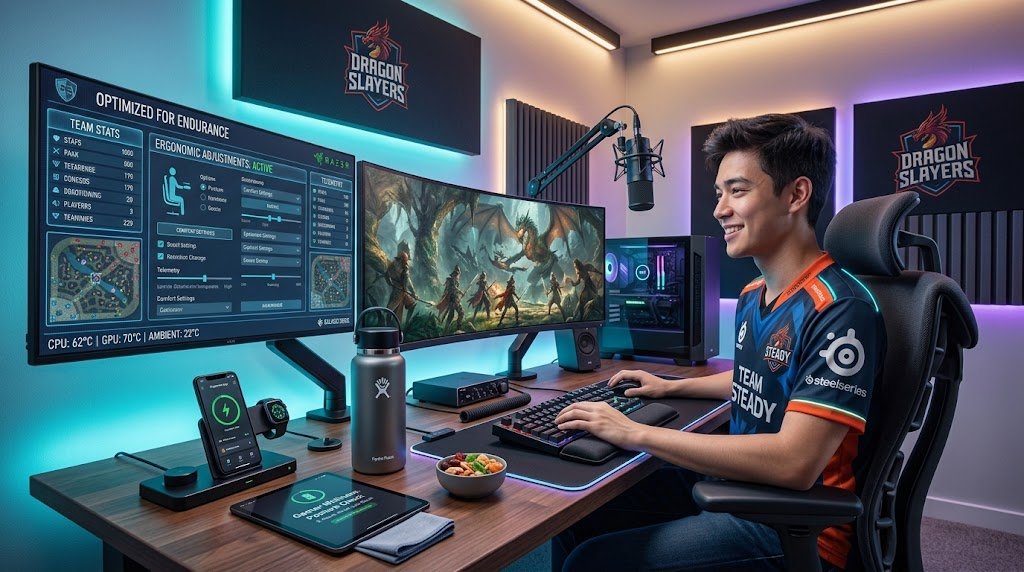
A marathon gaming session can be one of the most enjoyable ways to spend an evening or a weekend, but it can also leave you with a sore back, tired eyes, aching wrists, and a foggy head. Most of these problems don’t come from gaming itself. They come from a setup that was never designed for hours of sitting, staring, and clicking. The good news is that a few thoughtful changes to your chair, desk, screen, peripherals, lighting, and habits can make long sessions far more comfortable and sustainable. This guide walks through each piece of the puzzle so you can build a space that supports you as well as the game.
Start with the Chair
Your chair is the foundation of your entire setup, and it is the place where comfort is either won or lost. A dining chair or a kitchen stool might look fine for a quick match, but after two hours it will start to work against your posture. A good gaming or ergonomic chair should offer adjustable seat height, so your feet rest flat on the floor with your knees roughly level with or slightly below your hips. It should also have lumbar support that fills the natural curve of your lower back, and ideally an adjustable backrest that lets you recline slightly. Slight recline is often more comfortable than sitting bolt upright, because it reduces pressure on your spine and discs.
If a dedicated chair is outside your budget, you can still improve what you have. A small lumbar cushion or a rolled towel behind your lower back can make a noticeable difference. A footrest can help if your feet dangle, and a firm seat cushion can soften a hard surface. The goal is simple: your body should feel supported, not held in place by tension.
Set Up Your Desk and Monitor Height
Once your chair is right, the desk and screen come next. Your forearms should rest on the desk or armrests at roughly a ninety-degree angle, with your shoulders relaxed rather than hunched. If the desk is too high, you will lift your shoulders and strain your neck. If it is too low, you will slump forward. Desk depth matters too, since you want enough room for your mouse, keyboard, and any controller or accessories without overreaching.
The monitor deserves particular attention. The top of the screen should sit at or slightly below eye level, so your gaze falls naturally toward the center of the display without tilting your head up or down. The screen should be roughly an arm’s length away, which is a useful rule of thumb for reducing eye strain.
If you use a single monitor, place it directly in front of you rather than off to one side, since a twisted neck over a long session is a common source of discomfort. Monitor arms or stands are inexpensive ways to achieve precise height and angle adjustments, and they free up desk space as well.
Choose Peripherals That Fit Your Hands
Your keyboard, mouse, and controller are the points of contact between you and the game, so they play a big role in how your hands and wrists feel after hours of use. A mouse that is too small or too large can cause your hand to cramp, and a grip style that doesn’t suit your hand size can lead to fatigue. Try to choose a mouse shaped to your palm, and consider a model with comfortable side buttons you can reach without stretching. Some gamers find a vertical mouse reduces forearm strain, though it does take a short adjustment period.
For keyboards, a layout that keeps your wrists relatively straight is ideal. Wrist rests can help maintain a neutral position, but they should support the heel of your hand rather than encourage you to rest your wrists on them while actively typing or aiming. Keep your mouse close to your keyboard so your shoulder doesn’t have to reach out to use it.
If you play with a controller, make sure your posture allows your thumbs to rest naturally on the sticks and buttons, and avoid gripping the controller tightly for long periods. Lightening your grip and taking breaks to shake out your hands are simple habits that prevent a lot of discomfort.
Protect Your Eyes with Lighting and Screen Settings
Eye strain is one of the most common complaints after long gaming sessions, and it is often caused by a mismatch between screen brightness and the surrounding room. A dark room with a bright monitor creates a strong contrast that forces your eyes to work harder. Ambient lighting that is roughly similar in brightness to your screen reduces this strain. Indirect lighting, such as a soft lamp or LED strip behind the monitor, can also help. Avoid placing your monitor directly in front of a window, where glare can wash out the image, or directly facing a light source that reflects off the screen.
Screen settings matter as well. Lower the brightness to a comfortable level, adjust contrast so text and details remain clear without harshness, and consider enabling a blue light filter or night mode if you play late. Many games and operating systems offer these options. Refresh rate and resolution affect smoothness and clarity, but the most important factor for comfort is that the image looks natural to your eyes rather than glaring or washed out.
Finally, follow the 20-20-20 guideline, which is widely recommended by eye care professionals: every twenty minutes, look at something about twenty feet away for at least twenty seconds. Blinking more consciously also helps, since people tend to blink less when focused on a screen, which can leave eyes dry and irritated.
Build Healthy Habits Into Your Sessions
Even the best equipment cannot fully compensate for hours of sitting without movement. The most comfortable gaming setups are paired with habits that keep your body from locking into one position. Plan short breaks, perhaps five minutes every hour, to stand up, stretch your back and shoulders, roll your neck gently, and walk around. Hydration matters too. Keep a water bottle nearby so you are not tempted to skip drinking during intense moments. Snacks that are not heavy or greasy can help maintain energy without leaving you sluggish.
It is also worth paying attention to your posture throughout a session. Many gamers lean forward as the action heats up, hunching their shoulders and pushing their head toward the screen. Periodically checking in with yourself, noticing whether your shoulders have crept up or your back has rounded, and resetting your position can prevent slow-building strain. Stretches for the wrists, forearms, neck, and hips are simple to perform between matches and can make a meaningful difference over time.
Consider the Room and Ambience
Beyond the desk itself, your room shapes how comfortable a long session feels. Temperature is important, because a room that gets too warm can cause fatigue and drowsiness, while one that is too cold can leave you tense. Good ventilation and a fan or air purifier can keep the air fresh during marathon sessions.
Noise matters too. Headphones with comfortable ear cushions can reduce distraction and protect your hearing, and keeping the volume at a moderate level helps prevent fatigue. If you share your space with others, a rug or acoustic panels can soften echo and make the room feel calmer.
Organization also contributes to comfort. Keeping cables managed, snacks and drinks within reach, and frequently used items in easy access reduces the small interruptions and stretches that add up over a long night. A tidy, intentional space tends to feel more relaxing and makes it easier to focus on the game.
Conclusion
A comfortable gaming setup for long sessions is not defined by expensive hardware alone. It comes from thoughtful choices that support your body and senses: a chair that holds your spine in a healthy position, a desk and monitor arranged to keep your neck and shoulders relaxed, peripherals that suit your hands, lighting and screen settings that protect your eyes, and room conditions that keep you alert without strain.
Equally important are the habits you bring to each session, including regular breaks, stretching, hydration, and mindful posture. Start with the changes that address your most pressing discomfort, whether that is a sore back, tired eyes, or aching wrists, and build from there. Over time, these small improvements add up to a space where you can play longer, feel better afterward, and enjoy every session to its fullest.